Turn Any Screen-Recording into a 10-Page Manual in 30 Seconds
Drop in a Loom, YouTube link or MP4. VidSOP transcribes the audio, captures the key screenshots and writes a clean, numbered SOP you can export as a branded PDF.
Drag and drop your recording
MP4, WebM or MOV — or tap to browse
Inside a finished guide
See the steps for yourself.
Explore two sample manuals. Move through the screenshots, see where to click, and inspect the PDF you can take away.
Resetting 2FA in Slack
A guided walkthrough for updating two-factor authentication and protecting recovery codes.
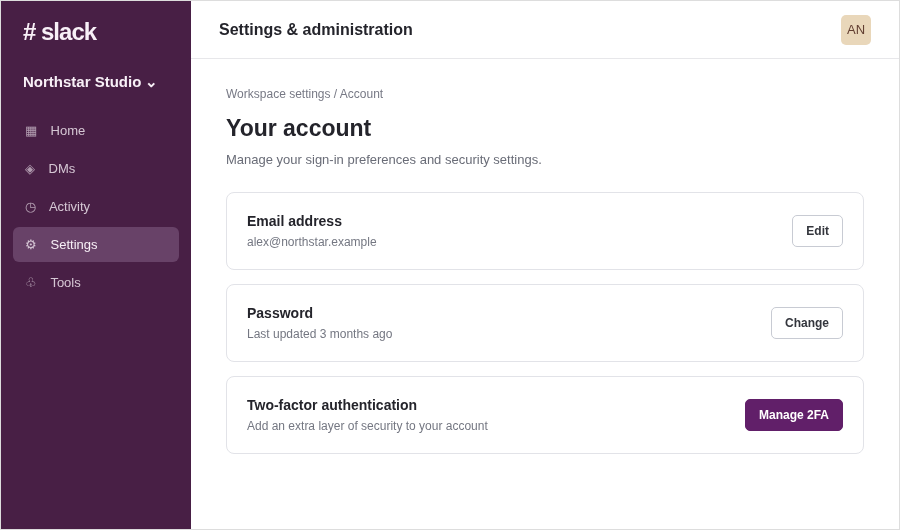
1. Open your account settings
In your Slack workspace, open Settings and administration, then go to Your account. Find the Two-factor authentication row and select Manage 2FA.
Illustrative sample data · no account needed to explore
Create your own guideYour connection is protected with HTTPS.
Your recordings and manuals are only visible to your account unless you turn on sharing.
Privacy covers help hide personal information in screenshots on eligible plans.
How it works
1. Add your recording
Upload an MP4 or paste a share link. Nothing to install.
2. We do the work
Audio is transcribed, key moments are screenshotted, steps are written.
3. Edit and export
Tidy the wording, re-order steps, translate, then export a branded PDF.
Simple pricing
Start free. Upgrade when your team needs more. Need a little extra? Add 10 credits for a one-time $5.
Free Starter
$0
per month
- 5 guides per month
- 720p screenshots
- Standard PDF export
- VidSOP watermark
Pro Creator
$29
per month
- Unlimited guides
- 1080p / 4K screenshots
- Custom branding and logo
- Auto-blur privacy guard
- Translate into up to 3 languages
- No watermark
Agency / Team
$89
per month
- Everything in Pro
- Unlimited team seats
- 50+ languages
- Interactive web guides and embeds
- Custom domain (CNAME)
- Priority processing
Frequently asked questions
What does VidSOP do?
VidSOP turns screen recordings, Loom videos and YouTube links into step-by-step SOP manuals with screenshots that you can export as a branded PDF or share as a web guide.
Which videos can I use?
MP4, WebM and MOV uploads, Loom and YouTube links, or a screen recording made directly in VidSOP.
Is VidSOP free?
Yes. The Free plan includes 5 guides per month with a VidSOP watermark. Pro is $29/month and Agency is $89/month.
Can I translate my manuals?
Yes. Pro translates guides into up to 3 languages, and Agency unlocks 50+ languages.
Is my data private?
Recordings stay private to your account, and the auto-blur privacy guard hides passwords, card numbers, API keys and emails in screenshots.